> For the complete documentation index, see [llms.txt](https://algolytics-technologies.gitbook.io/algolytics/llms.txt). Markdown versions of documentation pages are available by appending `.md` to page URLs; this page is available as [Markdown](https://algolytics-technologies.gitbook.io/algolytics/scoring.one-platform/scenario-development/deployment.md).
# Deployment
Once your scenario is thoroughly validated you can deploy it.
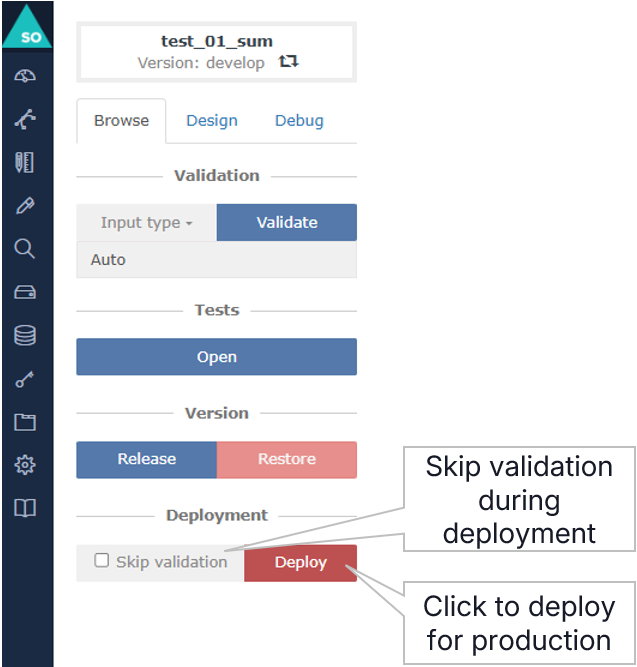
In a Browse tab at the bottom there is a red button Deploy. After clicking this button the process of validation is performed and, if passed successfully, deployment of the scenario. If you don't want to run validation tests, you can check Skip validation.
Once the scenario is deployed it should appear on the list of scenarios in the [Scenarios](/algolytics/scoring.one-platform/sidebar-menu-overview.md#scenarios) section of the main menu. Only one scenario version can be deployed. You can verify which version is currently deployed in a column Version in the table of scenarios in the [Scenarios](/algolytics/scoring.one-platform/sidebar-menu-overview.md#scenarios) section.
Now, you can use this scenario in three different ways:
* in [Forms](/algolytics/scoring.one-platform/sidebar-menu-overview.md#forms) from the main menu
* [as an API endpoint](/algolytics/scoring.one-platform/rest-api/scenario-execution-with-api.md#synchronous-scenario-execution)
* in other scenario using [SCENARIO CODE](/algolytics/scoring.one-platform/scenario-building-blocks/scenario-code.md) or [MULTITASK](/algolytics/scoring.one-platform/scenario-building-blocks/multitask.md) nodes
Every call to the deployed scenario is registered in logs and you can find these logs in [Scoring Results](/algolytics/scoring.one-platform/sidebar-menu-overview.md#scoring-results) from the main menu or directly in MongoDB, where natively the logs are stored. In some cases it may be useful to use advanced query in MongoDB to retrieve only the results matching some criteria.
### Management of scenarios
Considering the case of many scenarios in the platform it is beneficial to keep some rules, which help to manage scenarios effectively.
* Determining the convention of scenario names, models, e.g. \ \ \
* Extracting atomic, repetitive operations to separate scenarios, hierarchical structure of scenarios
* Modularity - change in one place is included in all scenarios that use the given operation
* A library of reusable components
* Keeping a register of changes (date, person, purpose, document with the version after the change)